
A warning light appears on a busy morning, and the first question is often, “When was this last checked?” The answer may be in a workshop invoice, a phone reminder, an old notebook, or nowhere at all.
Most vehicle problems are not prevented by remembering every technical detail. They are prevented by noticing patterns: fuel use rising gradually, tire pressure needing frequent correction, a battery cranking more slowly, or a service interval approaching.
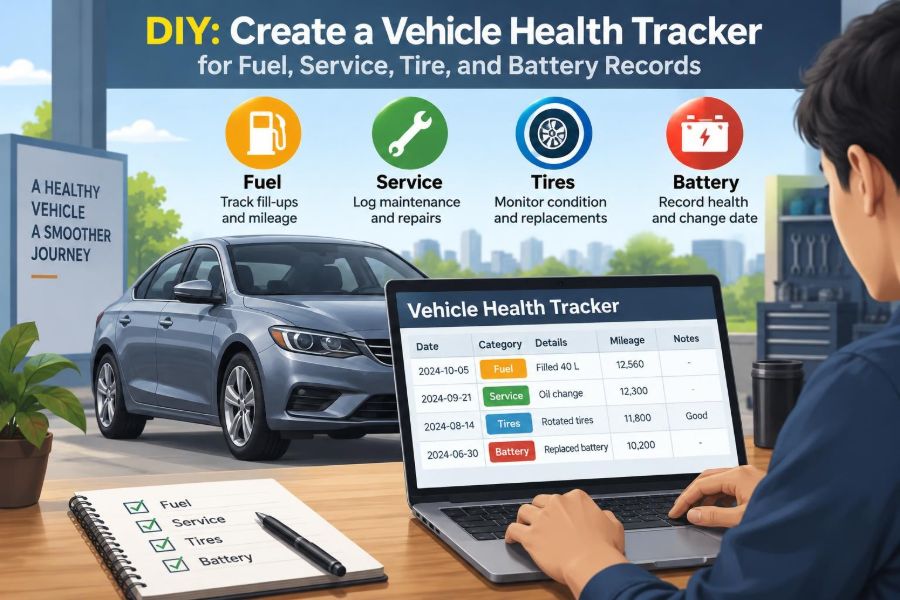
A vehicle health tracker turns scattered information into a usable maintenance history. It can be a paper logbook, a spreadsheet, a note-taking app, or a small database; its value comes from consistent records rather than sophisticated software.
For students learning automobile engineering and professionals responsible for vehicles, this is also a practical exercise in condition monitoring. You are collecting operating data, identifying deviations, and making decisions before minor issues become inconvenient failures.
🧭 Define What a Vehicle Health Tracker Does
A vehicle health tracker is a structured record of operating and maintenance information. Its basic purpose is to answer four questions quickly: how much the vehicle is used, what has been done to it, what condition its key systems are in, and what needs attention next.
It is not a substitute for a manufacturer’s maintenance schedule, a diagnostic scan, or a trained technician. Instead, it gives those tools useful context. A technician can investigate a complaint more efficiently when you can say when it began and what changed beforehand.
🎯 Start With a Practical Tracking Goal
Choose a goal before building the tracker. A daily commuter may need fuel economy, scheduled servicing, tire condition, and battery age. A family car used occasionally may need stronger reminders for time-based maintenance and battery checks.
A fleet-oriented version may add driver identity, trip purpose, defect reports, and downtime. Do not begin by recording every imaginable parameter. The best tracker is the one you can update after every relevant event.
- Reduce surprise breakdowns through timely inspection.
- Understand changes in fuel consumption.
- Keep service invoices and parts details organized.
- Spot repeated faults or unusual wear.
- Support resale discussions with a clear maintenance history.
🗂️ Choose a Format You Will Actually Maintain
A ruled notebook is simple, durable, and useful in a garage, but calculations and reminders are manual. A spreadsheet is flexible, can calculate mileage automatically, and is usually enough for one or several vehicles.
A dedicated app may provide notifications and receipt storage, although its fields may not match your needs. A practical compromise is a spreadsheet for the master record and a phone note or form for quick entry at a fuel station.
Whatever format you choose, back up digital records and photograph paper records occasionally. A tracker that disappears with a lost phone is not a maintenance history.
🪪 Create a Vehicle Profile First
Place a vehicle profile at the front of the log. This information rarely changes, yet it prevents ambiguity when records are shared or maintained across several years.
- Make, model, model year, and variant
- Vehicle identification number and registration details, where appropriate
- Fuel type, engine capacity, transmission type, and drive configuration
- Recommended tire sizes and pressures from the vehicle placard
- Battery specification and installation date, once known
- Current odometer reading and the date the tracker began
Record the owner’s manual service requirements separately from your own reminders. Manufacturer instructions take priority where a specific fluid grade, inspection method, or service interval is stated.
📏 Make Odometer Reading Your Common Reference
The odometer is the most useful common reference because fuel, tire wear, and many service tasks relate to distance travelled. Enter it whenever you fill the tank, carry out maintenance, replace a part, or observe a fault.
Time matters too. Brake fluid, coolant, rubber components, batteries, and engine oil can age even when a vehicle travels little. Every entry should therefore include both date and odometer reading.
If an odometer is replaced or becomes unreliable, write down the old reading, the replacement date, and the new starting reading. Do not silently merge the two values; future calculations would become misleading.
⛽ Build a Reliable Fuel Log
A fuel log is the most frequently updated part of a tracker. At each refuelling event, record the date, odometer reading, fuel quantity, total cost if useful, and whether the tank was filled to a similar level as usual.
For consistent consumption calculations, use the full-to-full method: fill the tank, drive normally, then refill to a similar automatic pump shut-off point. The amount added at the next fill approximately represents the fuel used over that distance.
A partial refill is still worth recording, but label it clearly. Mixing partial and full fills without notes produces figures that look precise but do not represent actual consumption.
🧮 Calculate Fuel Economy Without Misreading It
Fuel consumption can be expressed in litres per 100 kilometres, miles per gallon, or kilometres per litre. Use one method consistently. For litres per 100 kilometres, calculate:
Fuel consumption = (litres added ÷ distance travelled) × 100If 42 litres are added after 560 km, consumption is 7.5 L/100 km. This single number is less useful than a trend across several full-tank intervals because traffic, weather, idling, payload, and trip length naturally vary.
Compare similar journeys where possible. A sudden, repeatable increase under comparable conditions deserves inspection; one poor tank during heavy traffic may simply reflect how the vehicle was used.
📉 Interpret Fuel Changes Carefully
Rising fuel use can be associated with low tire pressure, persistent short trips, heavy loads, roof accessories, aggressive acceleration, brake drag, incorrect engine management, or a mechanical fault. The tracker identifies a change; it does not diagnose the cause by itself.
Note context beside unusual entries. For example, “three days of city congestion,” “long highway trip with roof box,” or “air-conditioning used heavily” makes later comparisons more honest.
Fuel records are especially valuable when paired with repair history. If economy changed after a service or repair, that timing is useful information to review, not proof that the work caused the change.
🛠️ Separate Scheduled Service From Repairs
Scheduled service is planned work based on time, distance, or the manufacturer’s maintenance schedule. Repairs correct a fault, wear condition, accident damage, or failed component. Keep them in separate categories so that recurring repairs do not disappear inside routine servicing.
For every workshop visit or DIY task, record what was inspected, what was replaced, the part specification if known, labour notes, invoice reference, and the next recommended action. “Service completed” is too vague to be useful six months later.
📅 Build a Service Schedule With Two Triggers
Each maintenance item needs a distance trigger, a time trigger, or both. Oil service, for example, may be due after a stated distance or period, whichever comes first. A low-mileage vehicle can still exceed the time limit.
| Record field | Why it matters |
|---|---|
| Last service date and odometer | Establishes the starting point for the next interval. |
| Required interval | Separates manufacturer guidance from personal estimates. |
| Due date and due odometer | Provides both time- and distance-based reminders. |
| Work completed | Shows whether all required tasks were actually performed. |
| Evidence | Links an invoice, receipt, or photo to the entry. |
Set reminders before the due point, especially if workshop availability is limited. A reminder is a planning tool, not permission to ignore a warning light or obvious fault until the scheduled date.
🧾 Record Parts and Fluids Precisely
When practical, record the oil viscosity and approval, coolant type, brake fluid specification, filter brand or part number, and quantity used. Many vehicles require fluids that meet particular specifications; colour alone is not a reliable identifier.
This detail is helpful when diagnosing leaks, confirming compatibility, or avoiding accidental mixing. It also prevents a common DIY error: assuming that any product labelled for “all vehicles” necessarily meets the manufacturer’s requirement.
🔧 Add a Simple Inspection Checklist
Not every check needs tools. A monthly or pre-trip visual inspection catches simple issues that a service interval may not address promptly.
- Check for fresh fluid spots under the vehicle.
- Look for damaged lamps, cracked lenses, and worn wiper blades.
- Inspect tire sidewalls for cuts, bulges, or embedded objects.
- Confirm that dashboard warning lights behave normally at start-up.
- Listen for newly developed noises during braking, steering, or starting.
- Check that washer fluid and other user-checkable levels are appropriate.
Record only meaningful observations. Repeatedly writing “all okay” may be unnecessary, but noting a slowly worsening tire crack or a recurring coolant top-up creates a valuable timeline.
🛞 Track Tire Identity, Position, and Age
Tires are safety-critical components, and a tracker should treat each one as an individual item. Record brand, model, size, load and speed rating where relevant, purchase date, installation odometer, and position on the vehicle.
If tires are rotated, update positions. Without this, it becomes difficult to connect uneven wear to a specific corner of the vehicle or to know which tire has experienced the most service.
The spare tire deserves an entry too. It can be overlooked for years despite needing correct pressure and an inspection for age-related deterioration.
🌡️ Log Tire Pressure in Comparable Conditions
Tire pressure changes with temperature and with driving because the air inside heats up. For meaningful records, measure pressure when tires are cold: typically after the vehicle has been parked for several hours and before a substantial drive.
Use the pressure specified on the vehicle placard or manual for the load condition, rather than copying the maximum pressure printed on the tire sidewall. The sidewall number is generally a tire limit, not the vehicle manufacturer’s normal operating recommendation.
Record the target and measured pressure for each tire. A single reading may not reveal much, but a tire repeatedly lower than the others can justify checking for puncture damage, valve leakage, or wheel-rim issues.
📐 Measure Tread and Look for Wear Patterns
Measure tread depth at several points across the tire: inner shoulder, centre, and outer shoulder. Record the lowest practical reading, the measuring location, and whether the tire was measured cold or after use if that affects your procedure.
Wear patterns can provide clues, although they are not final diagnoses. Centre wear may be consistent with sustained overinflation, shoulder wear with underinflation, and one-sided wear with alignment or suspension concerns. Driving style and road surface also influence wear.
Use the legal minimum tread requirement applicable where the vehicle operates, but do not treat that limit as an ideal replacement target in all conditions. Wet-weather grip may decline before a tire reaches a legal minimum, and visible damage requires attention regardless of tread depth.
⚖️ Connect Tire Records to Alignment and Balance
Wheel alignment describes the angles that position the wheels relative to the vehicle and road. Wheel balancing corrects uneven mass distribution in the rotating wheel-and-tire assembly. They are related to tire performance but are different services.
Log alignment checks after a significant pothole impact, suspension work, repeated uneven wear, or a persistent steering pull. Log balancing when vibration is felt at particular road speeds or when tires are mounted. A tracker helps distinguish a one-time event from an unresolved repeat complaint.
🔋 Understand What Battery Records Can Tell You
The 12-volt battery starts most conventional vehicles and supports electrical systems when the engine is off. In hybrids and electric vehicles, it often still operates control systems even though a high-voltage traction battery also exists.
Record the battery type, rated capacity or specification, installation date, and any test result supplied by a workshop. Battery age alone does not determine health; climate, charging system behaviour, trip pattern, and electrical loads all affect service life.
For hybrid or electric vehicle high-voltage systems, follow the manufacturer’s procedures. Do not attempt to inspect or repair high-voltage components without appropriate training, equipment, and isolation procedures.
⚡ Record Starting Symptoms, Not Just Voltage
A voltage reading can be informative, but it is only one snapshot. Surface charge, recent driving, temperature, and measurement method affect it. A battery may show a seemingly normal resting voltage yet perform poorly under starting load.
Record symptoms such as slow cranking, repeated clicking, dimming lights during start, warning messages, or a battery that needs charging after short parking periods. Note the ambient conditions and how long the vehicle had been parked.
A proper battery or charging-system test generally evaluates behaviour under load and may assess charging output. If symptoms repeat, arrange appropriate testing rather than repeatedly replacing the battery without checking for parasitic electrical drain or charging faults.
🔌 Track Charging Habits and Electrical Loads
Short journeys may not fully replace the energy used for repeated starts, particularly in cold conditions or with heated screens, blowers, lights, and accessories operating. Record a pattern of infrequent long drives or extended parking if it aligns with battery complaints.
For plug-in vehicles, a useful tracker can include charging dates, charge level, charging location, and unusual charge interruptions. This is an operational record, not a precise battery-health assessment; displayed range changes with temperature, speed, terrain, and cabin conditioning.
🚨 Create a Fault and Warning-Light Log
Warning lights are messages to investigate, not merely dashboard decorations. When one appears, record the symbol or wording, date, odometer reading, driving condition, and whether it stayed on, flashed, or disappeared after restarting.
For an engine-management warning, note rough running, reduced power, fuel smell, smoke, or changes in fuel use. For brake, temperature, oil-pressure, or charging warnings, follow the vehicle manual immediately because some warnings can require stopping safely and avoiding further driving.
Do not clear a warning merely to make the dashboard look normal. Erasing diagnostic information before it is read can remove useful clues.
🧠 Use Diagnostic Codes Responsibly
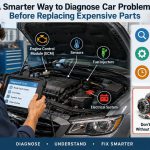
An on-board diagnostic scanner may retrieve diagnostic trouble codes on many vehicles. A code identifies a circuit, sensor signal, or operating condition that prompted the control module to store information; it does not automatically identify the failed part.
Record the exact code, its description from a reliable source, freeze-frame information if available, and whether it is current, pending, or historical. Then record the test or repair that resolved it. Replacing components solely because their names appear in a code description is a common and expensive mistake.
🗒️ Include Driver Observations as Data
Drivers often detect changes before instruments do. Add a free-text field for noise, vibration, harshness, smell, steering feel, brake feel, or changes in engine response. The engineering term NVH—noise, vibration, and harshness—covers many of these subjective but useful observations.
Make descriptions specific. “Vibration at 90 km/h through steering wheel” is more useful than “car shakes.” “Click from front left while turning slowly” gives a workshop a starting condition to reproduce.
📊 Build a Clear Spreadsheet Structure
A simple workbook can use separate sheets for vehicle profile, fuel, maintenance, tires, battery, faults, and costs. Keep column names consistent and avoid merging unrelated records into one large table.
Useful spreadsheet fields include date, odometer, category, description, supplier, cost, next due date, next due odometer, and evidence reference. Use formulas only where they reduce effort, such as distance since last fill or days until the next scheduled task.
Protect formula cells if several people enter information. A broken calculation can quietly distort an otherwise careful maintenance record.
📱 Make Data Entry Fast Enough for Real Life
Record fuel while the receipt is still available, tire pressure immediately after measuring it, and repairs when the invoice arrives. Delayed entry encourages guessed odometer readings and missing details.
Create short entry templates. A fuel entry needs only a few fields; a repair entry can have a longer checklist. If you use a phone, take a photo of the receipt first, then enter details later from the image.
🧩 Review Trends Instead of Chasing Single Values
Monthly or quarterly reviews are where a tracker becomes more than a diary. Look for gradual changes: average consumption rising, one tire requiring air more often, repeated battery-related symptoms, or the same warning returning after repair.
Use enough data before drawing conclusions. A single fuel interval, pressure reading, or voltage measurement has limited meaning. Several comparable entries make a trend more credible, while still leaving room for changing driving conditions and measurement error.
💰 Add Cost Records Without Making Cost the Only Metric
Tracking cost helps with budgeting and can reveal the financial effect of repeated repairs. Separate routine consumables, scheduled service, unexpected repairs, tires, insurance-related work, and cosmetic work if you want meaningful categories.
However, the lowest immediate cost is not always the lowest operating cost. Delaying an appropriate repair can increase wear elsewhere, reduce reliability, or create a safety concern. Use cost data to plan, not to justify ignoring condition-based maintenance.
🧯 Know When Tracking Must Become Action
A tracker supports decisions, but it should never delay safety-critical action. Stop and seek appropriate guidance when the manual indicates that a warning requires it, when brakes behave abnormally, when steering control changes suddenly, when a tire has a bulge or severe damage, or when there is smoke, strong fuel smell, or overheating.
Likewise, do not conduct repairs beyond your competence. Safe DIY work requires correct lifting equipment, stable support, suitable tools, service information, and a clear understanding of hazards. A logbook is useful precisely because it tells you when professional assessment is justified.
❌ Avoid Common Tracker Mistakes
The most common failure is inconsistency: recording every second fuel fill, forgetting odometer readings, or entering a service months later from memory. The result looks organized but cannot support dependable comparisons.
- Using estimates without marking them as estimates.
- Comparing partial fuel fills as though they were full-to-full data.
- Assuming a dashboard code is a confirmed diagnosis.
- Recording tire pressure without noting cold or warm conditions.
- Ignoring time-based service requirements on low-mileage vehicles.
- Saving receipts without linking them to a date and odometer reading.
Correcting these habits is usually more valuable than adding more columns or installing a more complicated app.
🔒 Protect Personal and Vehicle Information
Vehicle records can contain registration details, location patterns, repair invoices, and identifiers. If the tracker is shared, decide which fields are necessary for each user and avoid placing sensitive identifiers in publicly accessible files.
Use sensible passwords and backups for digital records. When selling a vehicle, a maintenance summary can be helpful, but consider removing personal addresses, payment information, and unrelated travel history.
🤝 Use the Tracker During Workshop Visits
Bring a concise summary rather than handing over a long, unfiltered history. State the concern, when it occurs, odometer reading, relevant previous work, and any codes or observations. This improves communication without telling the technician what part must be replaced.
After the visit, compare the invoice with your tracker. Record the diagnosis offered, work completed, parts used, and any advice to monitor. If a symptom returns, you will have a clear sequence of events.
🚀 Expand the System Only When the Basics Work
Once fuel, service, tires, and battery records are reliable, you can add brake pad measurements, coolant checks, emissions-test dates, accessory-belt replacement, wash records, or telematics data. Add fields only if they will influence a maintenance or operating decision.
An advanced tracker may graph fuel economy or calculate cost per kilometre, but visual dashboards should serve the data rather than distract from it. A clean record with accurate dates and readings is more useful than an elaborate dashboard built on incomplete entries.
✅ Build a Record That Supports Better Decisions
A useful vehicle health tracker is not about predicting every failure. It creates a disciplined history of normal operation, maintenance actions, and exceptions. That history helps you recognize when a change is probably routine and when it deserves investigation.
Start small: log the next full fuel fill, photograph the current odometer, write down the last service details, inspect the tires, and record the battery installation date if available. Consistency will gradually turn these ordinary entries into practical engineering evidence.
The core principle is simple: record conditions consistently, compare trends in context, and act promptly when safety, service requirements, or repeat symptoms demand attention. 🚗🔧📘